Resources · Guide 15 · STEER
The right guidance setting in each tool, and how to tell when it's wrong
Your prompt doesn't draw anything. It steers. A text encoder turns your words into numbers, then at every step many models make two guesses, one with your prompt and one without, and guidance pushes the image in the direction of the difference. This guide gives you the setting and a starting value for each tool that has one (as of October 2026), what to use in the tools that don't, and how to read a burnt or ignored result.
How it works
result = without + guidance × (with − without)
What you'll make
- A starting guidance value per tool and model: Stable Diffusion 1.5, SDXL and 3.5, Flux dev, schnell and FLUX.2, in Automatic1111, Forge, ComfyUI, fal, Replicate and the BFL and Stability APIs
- What to touch instead in tools with no guidance control: Midjourney, ChatGPT images, Nano Banana, Ideogram
- How to spot too high (burnt, oversaturated, harsh) and too low (vague, ignores your words)
- A five-image sweep that finds the right value for your prompt in a few minutes
What you need
Automatic1111 / Forge
CFG Scale slider (and Distilled CFG Scale for Flux in Forge)
ComfyUI
cfg on the KSampler node, plus the FluxGuidance node for Flux
fal, Replicate, BFL API
guidance_scale or guidance on Flux endpoints
Stability AI API
cfg_scale on SD 3.5
Midjourney
No guidance control. --stylize and Raw are the nearest levers
Claude
Picks your starting value, plans the sweep and reads the results with you
Step by step
7 steps-
Know what you're turning
Classifier-free guidance (CFG) is the number that sets how hard the model follows your prompt. At each step the model predicts once with your prompt and once without it (or with your negative prompt), then moves further in the direction your prompt pulls. Higher number, harder push.
Too high and the colours burn: Google's Imagen paper describes high guidance weights giving "highly saturated and unnatural images". Too low and the picture drifts into something generic that half-ignores your words.
Not every tool has the dial. Some models are distilled so the guidance is baked in, and the big chat-style tools hide it completely.
-
Find the setting in your tool
Automatic1111 and Forge: the CFG Scale slider under the prompt (1 to 30, default 7). ComfyUI: cfg on the KSampler node (default 8.0).
Flux on fal: guidance_scale (default 3.5). On Replicate's flux-dev: guidance (default 3.5, maximum 10). BFL's own FLUX.2 [flex] endpoint: guidance (1.5 to 10, default 5). Stability AI's SD 3.5 API: cfg_scale (1 to 10).
No dial at all: Midjourney, ChatGPT images (the OpenAI Image API has no guidance parameter), Nano Banana, Ideogram, FLUX.2 [pro] and Kling's current 3.0 video API. Skip to the step on tools without a dial.
-
Start from the right number for your model
Stable Diffusion 1.5: 7 (Automatic1111's default; diffusers' default is 7.5). SDXL: start between 5 (the diffusers default for SDXL) and 7. SD 3.5 Large and Medium: 4 on Stability's API (its default), 3.5 to 4.5 in Hugging Face's own examples. SD 3.5 Turbo and Flash: 1.
Flux dev: guidance 3.5. Replicate's notes for flux-dev say "lower values can give more realistic images" and suggest trying 2, 2.5, 3 and 3.5. FLUX.2 [flex]: 5 is BFL's default.
Flux schnell is distilled to work in 1 to 4 steps with guidance at 0, so there's nothing to tune there.
-
Flux in Forge and ComfyUI: two dials, set one
Flux dev is guidance-distilled: the steering is trained into the model and you set it with a separate number. Forge's own Flux announcement says to set CFG Scale to 1 and use Distilled CFG Scale instead, default 3.5.
In ComfyUI, set KSampler cfg to 1.0 (ComfyUI's Flux examples say so) and set guidance on the FluxGuidance node, which also defaults to 3.5.
At CFG 1 the second guess is skipped. Forge's log says it outright: "Negative Prompts are ignored." So with Flux dev, put what you don't want into the positive prompt as what you do want ("clean empty background" rather than a negative "clutter").
-
Run a five-image sweep
Guess less, test more. Lock the seed so the only thing changing is guidance, then run five values around the starting point. For SDXL: 3, 5, 7, 9, 12. For Flux dev: 2, 2.5, 3.5, 5, 7.
Put them in a row. Somewhere in the middle the picture follows your prompt without looking cooked. That's your number for this kind of prompt.
Ask ClaudeI want to find the right guidance value. Tool: [Forge / ComfyUI / fal / Replicate / BFL API]. Model: [e.g. SDXL, Flux dev, FLUX.2 flex, SD 3.5 Large]. Prompt: [PASTE]. Tell me the setting's exact name in this tool, a sensible starting value with where that number comes from, and five values to sweep on a locked seed. Then give me a small table to note for each: follows the prompt (yes/partly/no), colour (natural/strong/burnt), detail (soft/good/harsh).
-
Read the result
Too high: oversaturated colour, harsh contrast, blown or crushed tones, an unnatural, overcooked look. Lower it by 1 to 2 (or by 0.5 for Flux).
Too low: muddy or washed-out colour, missing objects from the prompt, the subject drifts. Raise it by the same steps.
Still ignoring a word at a high value? That's a prompt problem, not a guidance problem. Move the word earlier, describe it more concretely, or remove words that fight it.
-
In tools without a dial, steer with the prompt
Midjourney: --stylize (or --s) runs from 0 to 1000, default 100. Midjourney describes low values as following the prompt more closely and high values as more artistic and free. For more literal results, lower --s or turn on Raw, which removes default styling.
ChatGPT images and Nano Banana: there's no dial, so the prompt is the only lever. Be specific: say what must be there, where, and what must not change. If an image ignores something, ask for that one fix in the same chat rather than rewriting everything.
Ideogram: no guidance control either. Its style type (in the API: Auto, General, Realistic, Design or Fiction) and the negative prompt change what it aims for, and Ideogram notes the prompt takes precedence over the negative prompt.
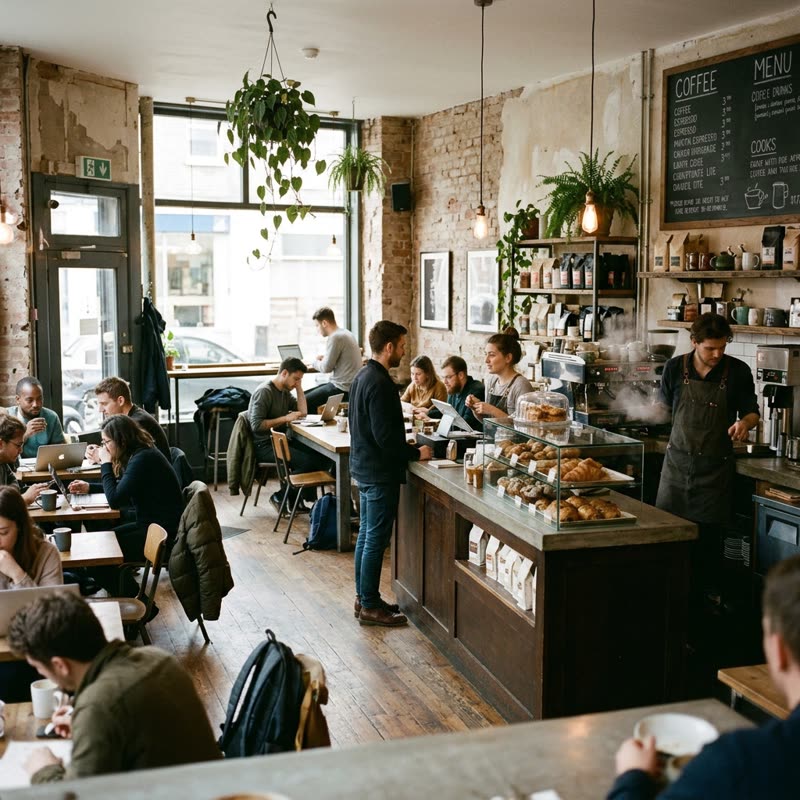 “A coffee shop.”
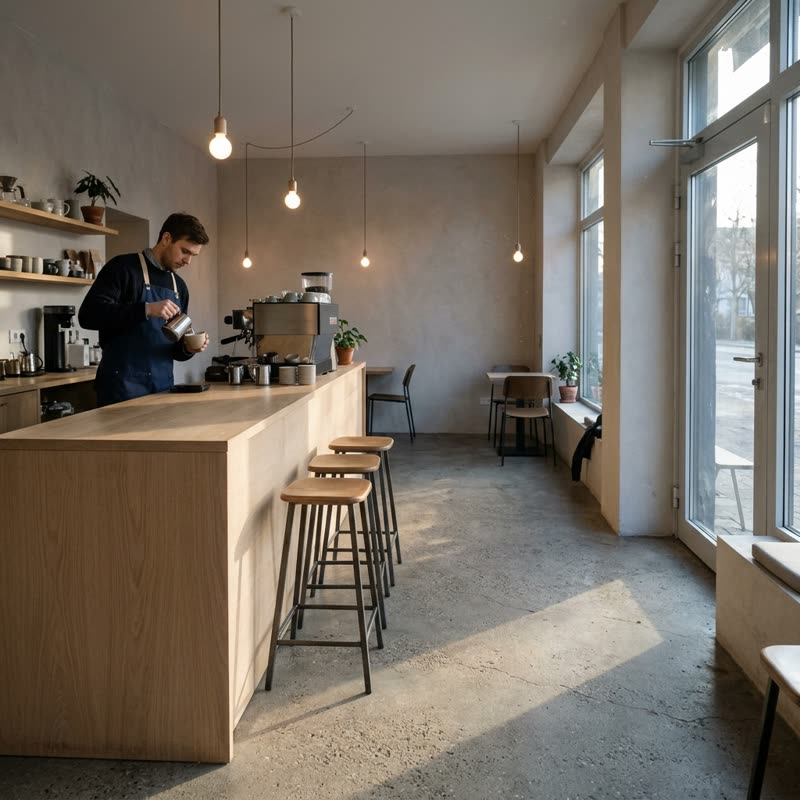 A specific brief
Nano Banana 2.1 has no guidance setting, so the prompt is the only lever. Left: “A coffee shop.” Right: the same idea with the time of day, viewpoint, counter, one barista, three empty stools, light, lens and “no signage” spelt out. Made for this guide on 31 October 2026.
Put it to work
-
Why a negative prompt sometimes does nothing
In Stable Diffusion-style tools the negative prompt replaces the "without your prompt" guess. Guidance then pushes away from it. That's why it stops working at CFG 1, the setting for Flux dev and for turbo models: there's no second guess to push away from.
-
Save your numbers
Keep a note of the value that worked per model and per kind of image (portrait, product, illustration). Photoreal work usually wants the lower end of a model's range, graphic and illustrated styles can take more. Check that against your own sweep, not a forum post.
Ask ClaudeTurn my sweep notes into a one-page settings card for my tools: model, setting name, my best value per image type (portrait, product, illustration, text-heavy), and the signs that tell me to go up or down. Notes: [PASTE].
Copy-paste prompts
I'm using [MODEL] in [TOOL]. What's the guidance setting called there, what's the default, and what value should I start at for a photoreal product shot? Tell me where the number comes from, and don't guess if you don't know the tool.
My SDXL images in Forge look oversaturated with harsh, crunchy edges. Settings: CFG [N], steps [N], sampler [NAME], seed [N]. Is guidance the likely cause? Give me a sweep of five lower CFG values on the same seed and tell me what to look for in each.
I'm running Flux dev in ComfyUI with KSampler cfg 1.0 and a FluxGuidance node at 3.5. My negative prompt "[NEGATIVE]" has no effect. Explain why in two sentences, then rewrite my positive prompt so it says what I want instead of what I don't. Prompt: [PROMPT].
Midjourney keeps adding things I didn't ask for and changing my composition. Prompt: [PROMPT]. Give me three versions to test on the same seed: one with --s 50, one with --s 0, and one with Raw turned on, and tell me what difference to expect from each.
Write me the five API calls (JSON bodies only) for a guidance sweep on [fal-ai/flux/dev or black-forest-labs/flux-dev]: same prompt, same seed [N], same size, guidance 2, 2.5, 3, 3.5 and 5. Use the exact parameter name that endpoint uses. Prompt: [PROMPT].
Tips
- Change guidance on a locked seed, or you're comparing two different pictures.
- Defaults differ between tools for the same model: Automatic1111 starts SDXL at 7, diffusers at 5. Neither is wrong; sweep.
- If the colours look burnt, lower guidance before you touch the prompt.
- If a word is ignored at a sensible guidance value, fix the prompt. Cranking guidance just burns the image.
- Turbo, flash and schnell models want guidance at or near 1 (or 0 for schnell). Raising it doesn't help.
- With Flux dev, leave CFG at 1 and change the separate guidance number.
Claude skill
Do it in one go with the guidance-settings skill
Tell Claude your tool, model and prompt. It names the guidance setting in that tool, gives a sourced starting value, plans a five-image sweep on a locked seed, and reads the results with you (burnt, ignored or right). In tools with no dial (Midjourney, ChatGPT images, Nano Banana, Ideogram) it tells you which lever to use instead.
Download guidance-settings.zipIn Claude (web or desktop app)
- Open Settings → Capabilities and make sure code execution is on.
- Under Skills, choose Upload skill and pick the zip.
- Start a chat and describe what you are making. Claude uses the skill on its own when it fits.
In Claude Code
- Unzip it into
~/.claude/skills/(or.claude/skills/in a project). - Restart Claude Code and ask for the result. The skill loads when it fits.