Resources · Guide 06 · LOOK
Turn flat garment sketches into on-model editorial shots
Draw your pieces as flats with a few notes, let Claude turn each one into a garment spec and an editorial brief, and get back on-model fashion images, ending on the full look walking a runway. This is the exact process behind the reel.
What you'll make
- A garment spec for every piece: fabric, colour, cut and details
- One on-model editorial image per piece (9:16), framed to show it
- The full look on a runway, every piece worn together
- Every prompt, ready to reuse for the next collection
What you need
Claude
Reads your flats and writes the garment specs, the styling and the editorial prompts
Z Image Turbo
Makes the images (we used it through the Higgsfield API; any strong image model works)
Step by step
7 steps-
Draw the flats
Draw each piece flat and front-on, the way a tech pack does: outline, seams, pockets, buttons, straps. Beside it write what it is and what it is made of, like "slip dress, satin, black, midi, thin straps" or "cropped jacket, denim, oversized, big patch pockets".
Add a colour swatch if you can: a filled square of the main colour. Photograph the sheet straight on in even light.
-
Have Claude write a garment spec for each piece
A garment spec is one line: fit, colour, fabric, garment type and the details that make it yours. In the reel the dress became "a black satin slip midi dress with thin straps" and the bag "a structured green leather top-handle bag with a gold clasp".
You will paste these lines word for word into every image that shows that piece, including the final runway shot. That repetition is what keeps the pieces recognisable from picture to picture.
Ask ClaudeHere is a photo of my flat sketches. For each piece write one garment spec line an image model can draw: fit, colour, fabric, garment type and the visible details (pockets, straps, clasp, panels, sole). Use only what I drew or wrote; if something is unclear, ask. No brand names. Under 20 words each.
-
Style the rest of the outfit
A jacket on its own needs something under it. Let Claude choose plain supporting pieces that do not compete with yours: the reel put the denim jacket over "a white t-shirt and wide cream trousers" and the bag with "a beige trench coat".
Ask Claude to mark which pieces are yours and which are styling, so nobody mistakes one for the other.
-
Write one editorial prompt per piece
Frame each image to show the piece: full body for a dress or jacket, close on the feet from a low angle for shoes, cropped at the waist for a bag.
Each prompt names the shot, the model, the garment spec word for word, the styling, the location and the light, and ends with the words that keep text and logos out.
Ask ClaudeFor each piece write one image prompt: "[Full body fashion photograph / Fashion photograph close on a model's feet / Fashion editorial photograph cropped at the waist] of a model wearing [garment spec, word for word] [styling pieces], [pose], [location], [light], editorial, no text, no letters, no logos, unbranded". Choose the framing that shows the piece best. Vary the locations. Vertical 9:16 frame. Never name a real model, designer or brand.
-
Generate and check for lettering
Run each prompt at 9:16. We used Z Image Turbo through the Higgsfield API (about $0.015 a picture), but Nano Banana, FLUX or Midjourney take the same prompts.
Look closely at every picture for letters and logos. Early prompts that said "magazine" came back with fake magazine lettering, and a sneaker grew a real brand's logo. Adding "no text, no letters, no logos, unbranded" fixed it. The final sneaker prompt also spells its panels out as "smooth plain red suede", leaving nothing for a logo to fill.
-
Put the full look on the runway
The last image puts every piece on one model on a catwalk. The prompt is simply all the garment specs in a row, from top to toe, with the bag last.
Ask ClaudeNow write the finale: "Runway photograph of a model walking a catwalk wearing [every garment spec, top to toe], carrying [the bag spec], blurred audience, fashion show lighting, full body, no text, no letters, no logos".
-
Know how close it gets
Each image is made from words, so a piece matches your flat by description, not stitch for stitch. Pocket shapes, hem lengths and hardware can shift between pictures. Make two or three of each and keep the closest.
If you need an exact match, an image-editing model such as Nano Banana can take your sketch as a reference image as well as the prompt. We did not use that for the reel.
The prompts behind the reel
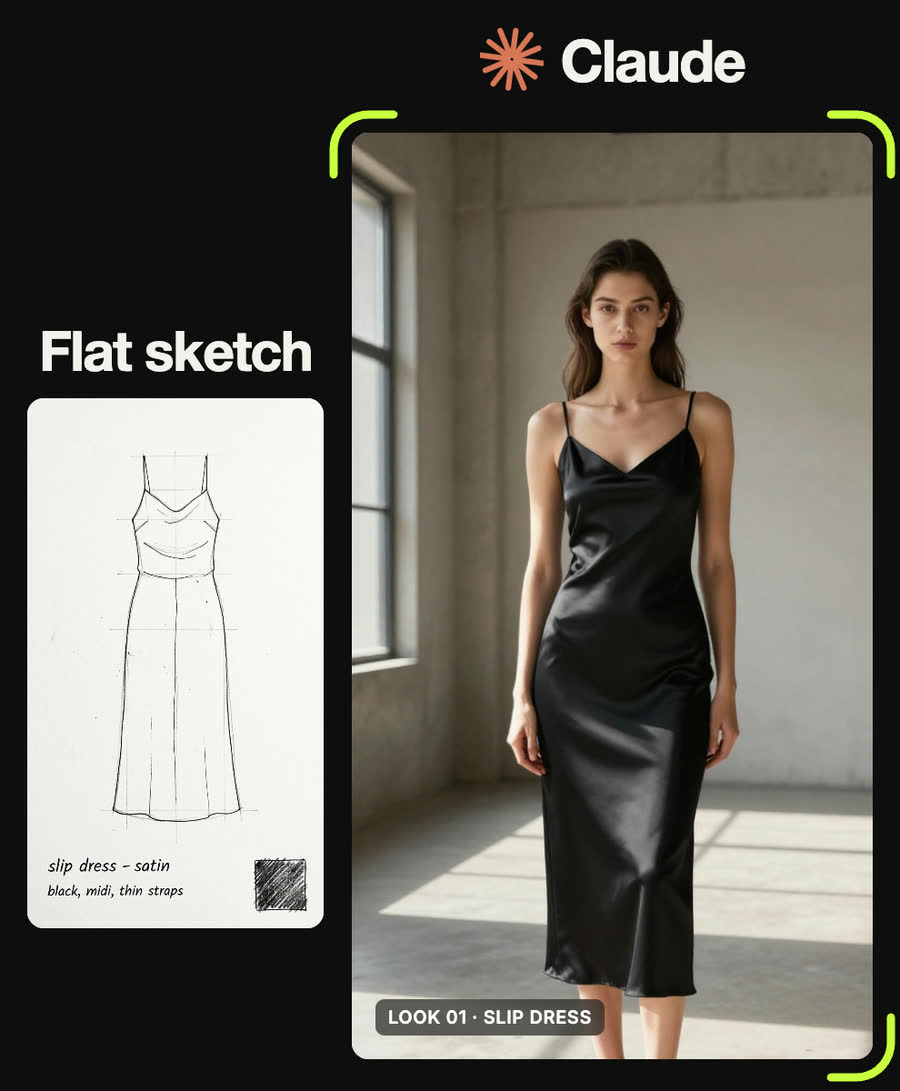
Full body fashion photograph of a model wearing a black satin slip midi dress with thin straps, standing in a sunlit concrete gallery, hard window light, editorial, no text
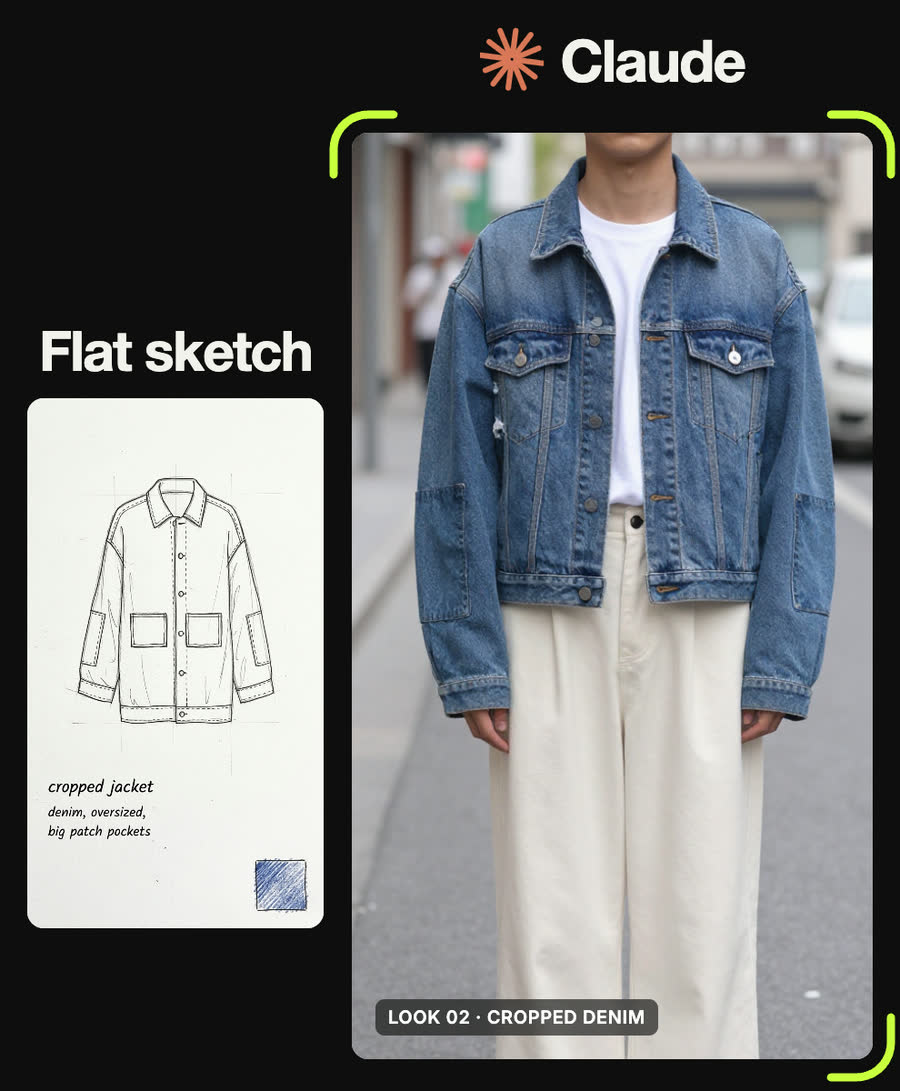
Full body street style photograph of a model wearing an oversized cropped denim jacket with large patch pockets over a white t-shirt and wide cream trousers, standing on a quiet city street, soft daylight, no text, no letters, no signage
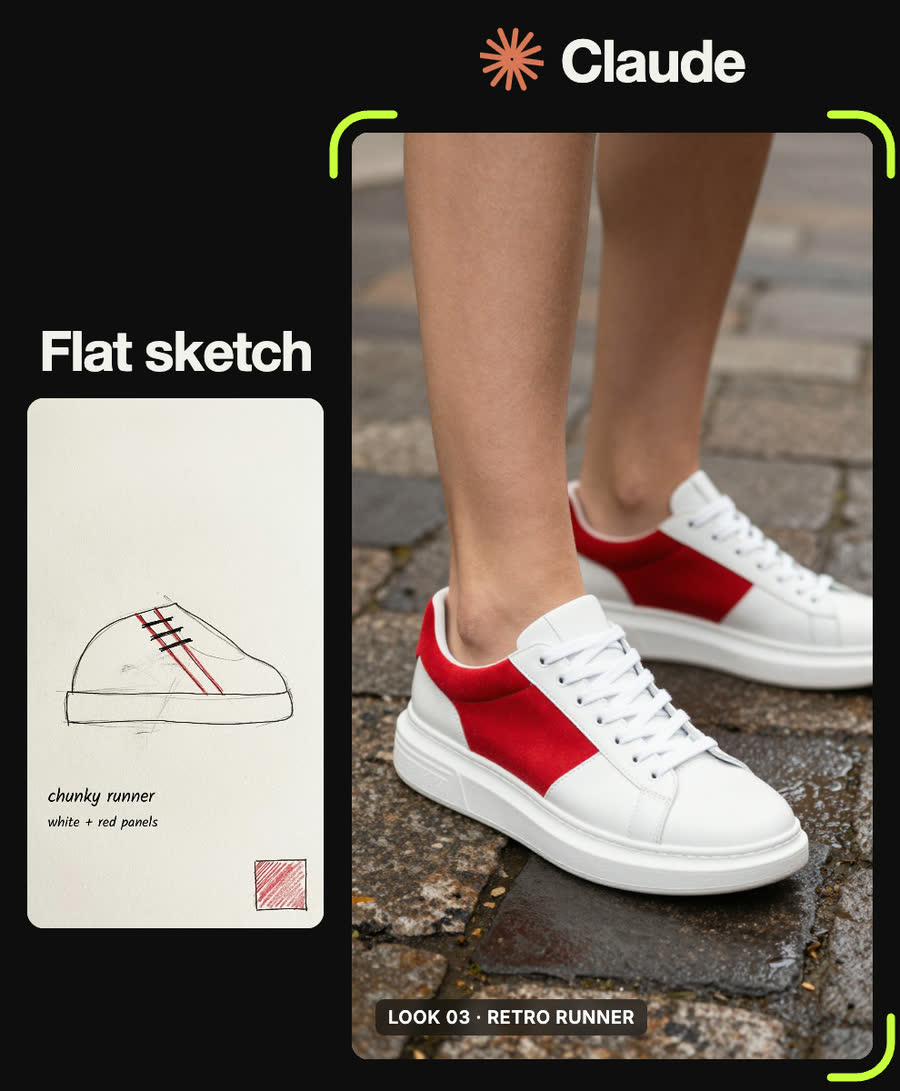
Fashion photograph close on a model's feet wearing chunky white leather trainers with smooth plain red suede panels and thick soles, no logos, no letters, stepping on wet cobblestones, low angle, editorial
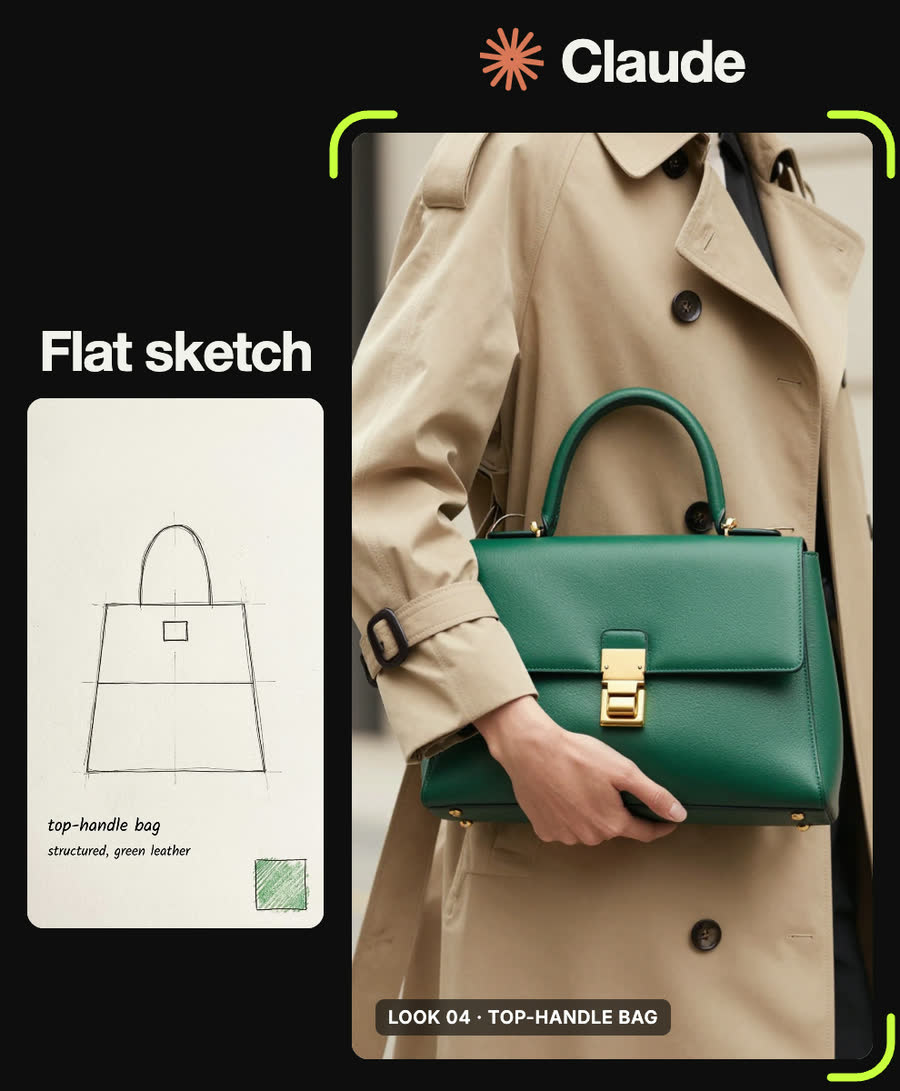
Fashion editorial photograph of a model holding a structured green leather top-handle bag with a gold clasp, cropped at the waist, beige trench coat, soft daylight, luxury magazine
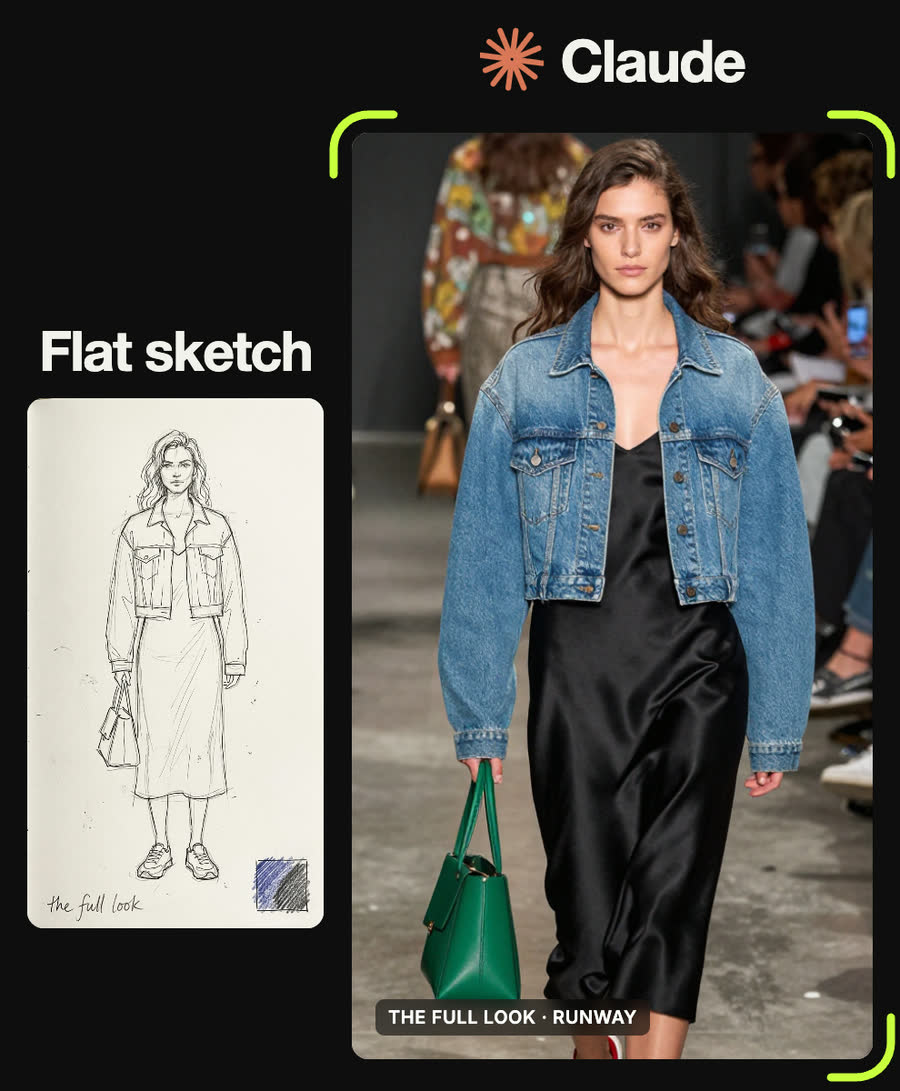
Runway photograph of a model walking a catwalk wearing an oversized cropped denim jacket, a black satin slip midi dress, chunky white and red sneakers and carrying a green top-handle bag, blurred audience, fashion show lighting, full body
Tips
- Write the fabric on the flat. The image model never sees your drawing, only Claude's words, so "satin" or "denim" has to be written down.
- Repeat each garment spec word for word wherever that piece appears, the runway shot included.
- Leave "magazine" and "Vogue-style" out of prompts. They invite fake lettering. The bag prompt above still says "luxury magazine" and came out clean, so treat it as a gamble, not a rule.
- In the reel it was the sneaker that grew a logo. For shoes, describe every panel as plain and add "no logos, unbranded".
- Never name a real model, designer or brand. Describe the look instead.
Claude skill
Do it in one go with the flat-sketch-to-on-model skill
Give Claude a photo of your flat garment sketches and it returns a garment spec per piece, styling for the rest of the outfit, one editorial prompt per piece and a runway prompt for the full look. In Claude Code with a Higgsfield key it can also generate the images for you.
Download flat-sketch-to-on-model.zipIn Claude (web or desktop app)
- Open Settings → Capabilities and make sure code execution is on.
- Under Skills, choose Upload skill and pick the zip.
- Start a chat, attach a photo of your input, and ask for the result. Claude uses the skill on its own.
In Claude Code
- Unzip it into
~/.claude/skills/(or.claude/skills/in a project). - Restart Claude Code and ask for the result. The skill loads when it fits.