Resources · Guide 23 · BLENDER
Blender to Seedance 2.5 Workflow
Plan one ambitious camera move, build it in Blender from plain blocks with one flat colour per subject, and give Seedance 2.5 that render plus a reference image for every colour. The blockout fixes the camera and the timing; Seedance paints real people, cars and places with its own natural motion and sound.
The 2-minute version
- Build the shot in Blender from plain boxes: one solid colour per subject (red = the hero, yellow = a group, green, blue…), grey for the set, one smooth camera move. Render 10 seconds.
- Make one reference image per colour, plus a film-look still ("shot on ARRI Alexa Mini LF, Kodak Vision3 500T, film grain") and one of the location.
- In Seedance 2.5 (Omni reference on Higgsfield), attach the render and the images, write "the red block is the striker in @Image 3" for every colour, and say the blocks are only a rough guide. Audio on.
How it works
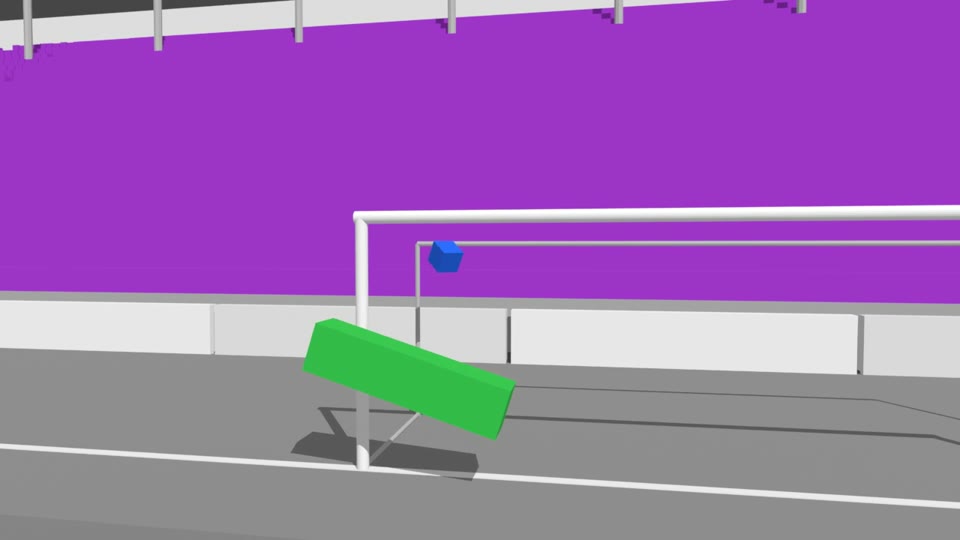 Blockout
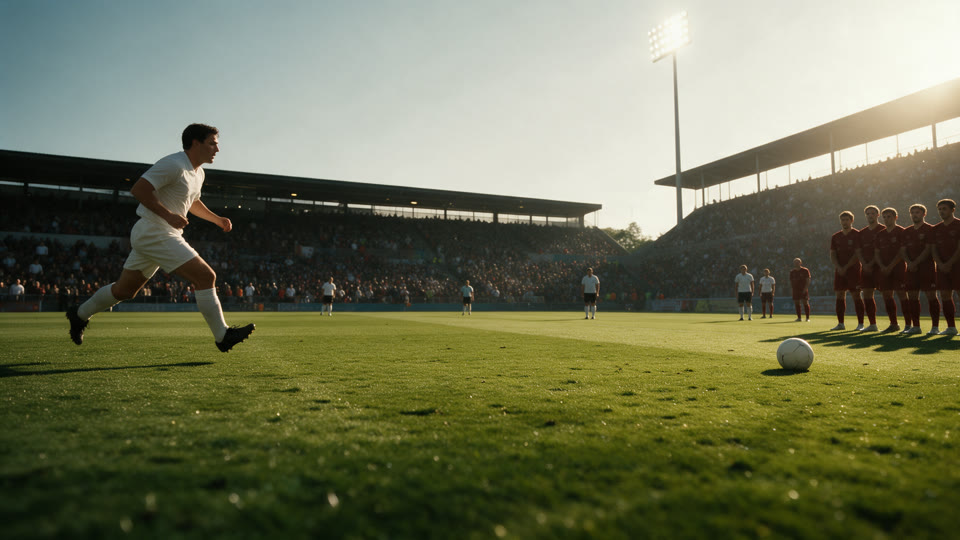 Look anchor
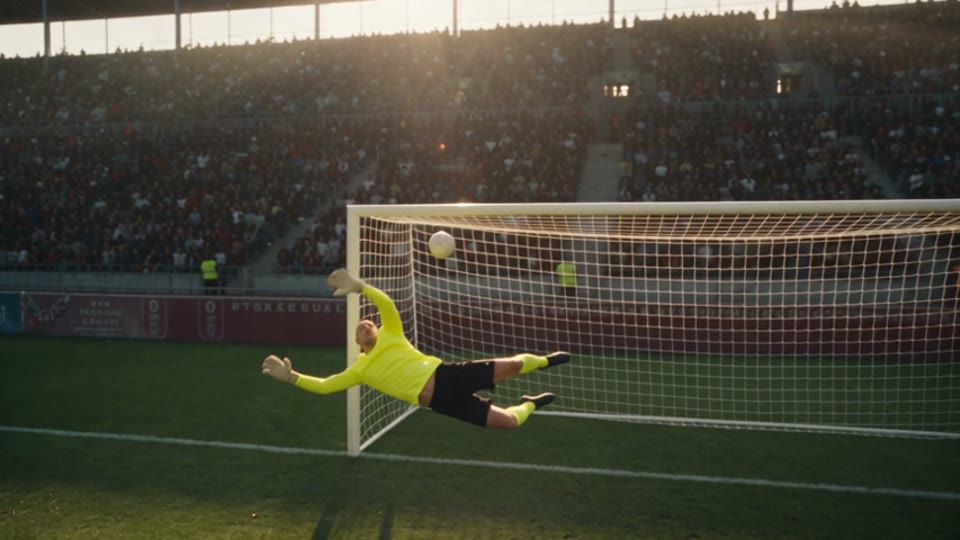 Seedance
What you'll make
- A 10-second Blender blockout: every subject a plain coloured block, one continuous camera move
- A reference pack: a film-look anchor, the location and one image per colour
- A Seedance prompt that maps every colour to its image
- The finished cinematic shot with Seedance's own sound
What you need
Blender
Builds and renders the blockout. Free; 4.2 or newer. You never model anything detailed: boxes and one camera
Claude
Plans the beats, writes the Blender scene as a Python file, writes every image prompt and the Seedance prompt (the skill below)
Seedream 5.0 or Nano Banana (on Higgsfield)
Makes the reference pack: the film-look anchor, the location and one image per colour
Seedance 2.5 (Higgsfield)
Renders the final shot from the blockout and the references, with sound
Step by step
7 steps-
Plan one camera move
Pick a shot that would be hard or impossible to film: an FPV dive off a rooftop, a bullet-time orbit, a crane that drops from overhead to wheel height. One continuous take of about 10 seconds; the move is the star.
Write it as 2 or 3 beats: what happens, what the camera does, and why it moves then ("drops to wheel height once the new wheels are on"). Then check the action against real life: a pit crew already stands on its marks when the car arrives, a car brakes steadily to a stop, a wall of players jumps as the ball goes over.
-
Block it out with plain coloured boxes
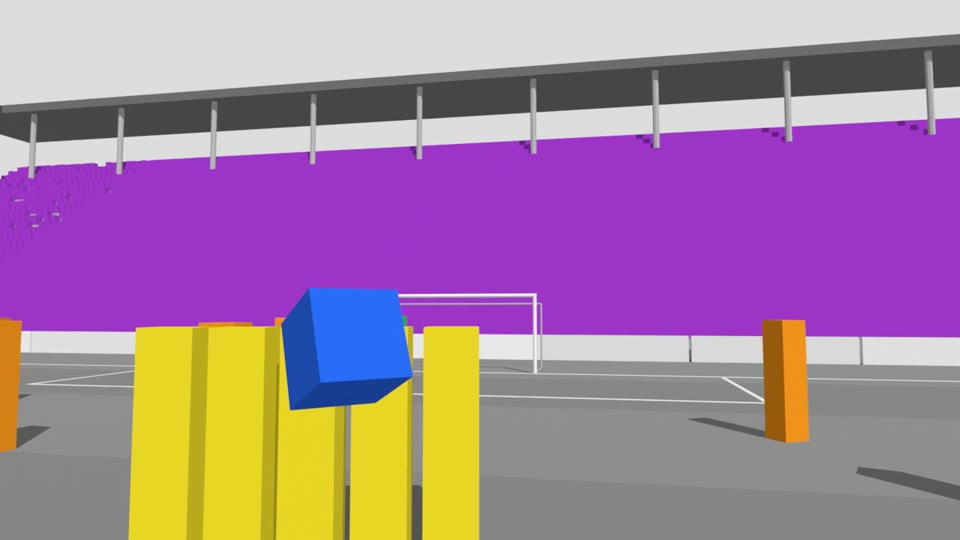
Every key subject is one plain block in one flat colour: red for the hero, yellow, green, blue, cyan and magenta for the other subjects or objects, orange for extra people, purple for crowds. A group that looks alike (a crew, a wall of players) shares a colour but stays separate blocks with gaps. The set is plain grey: roads, walls, stands, buildings. Nothing more.
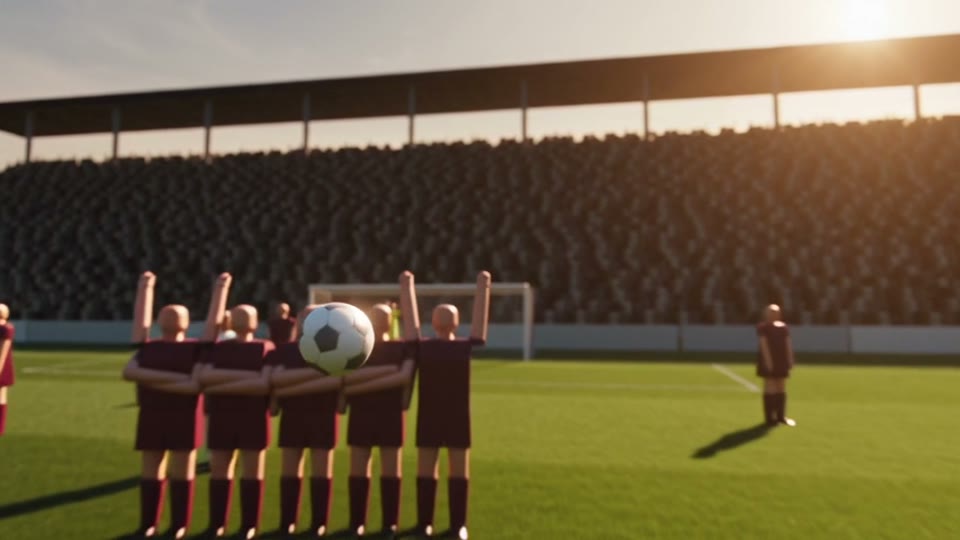
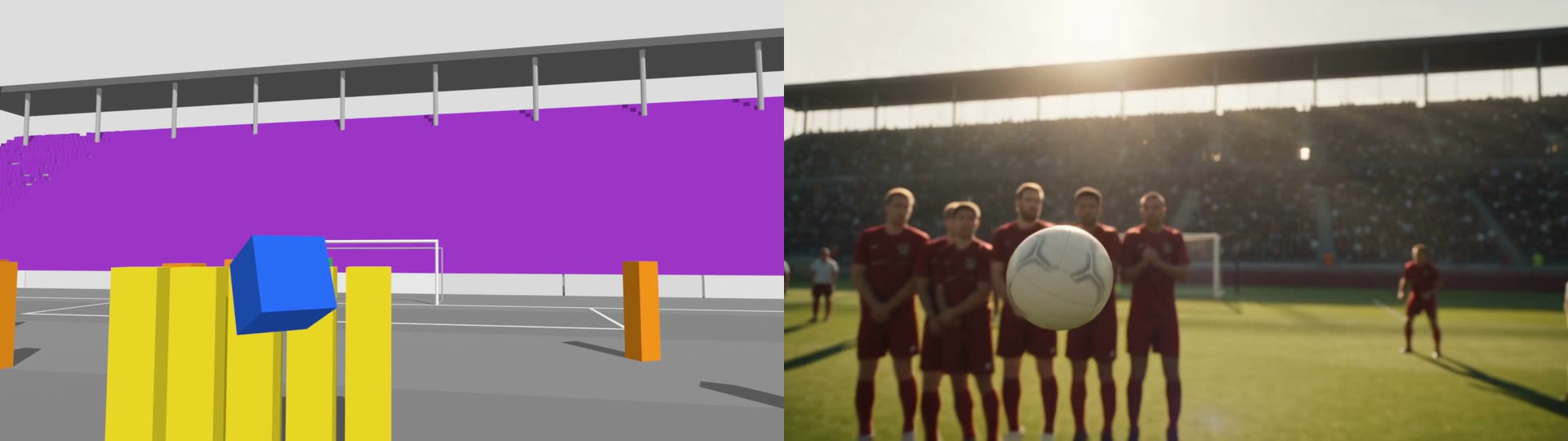
This is the step that matters most. Seedance copies anything it can recognise: box people with ball heads come back as wooden mannequins, a box car with wheels comes back as a toy. A coloured block gives it nothing to copy, so it draws the real thing from your reference image.
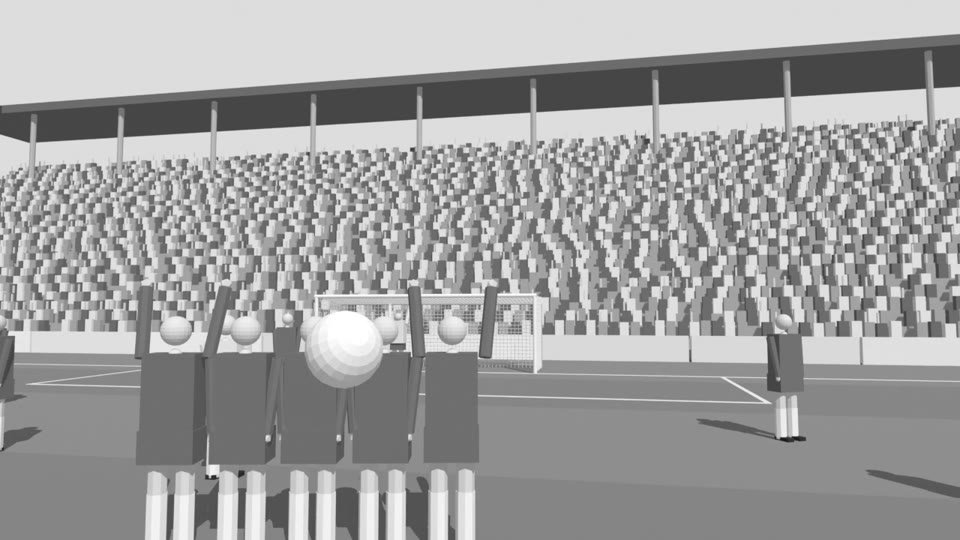 Detailed proxies
 What Seedance made
 Colour blocks
 What Seedance made
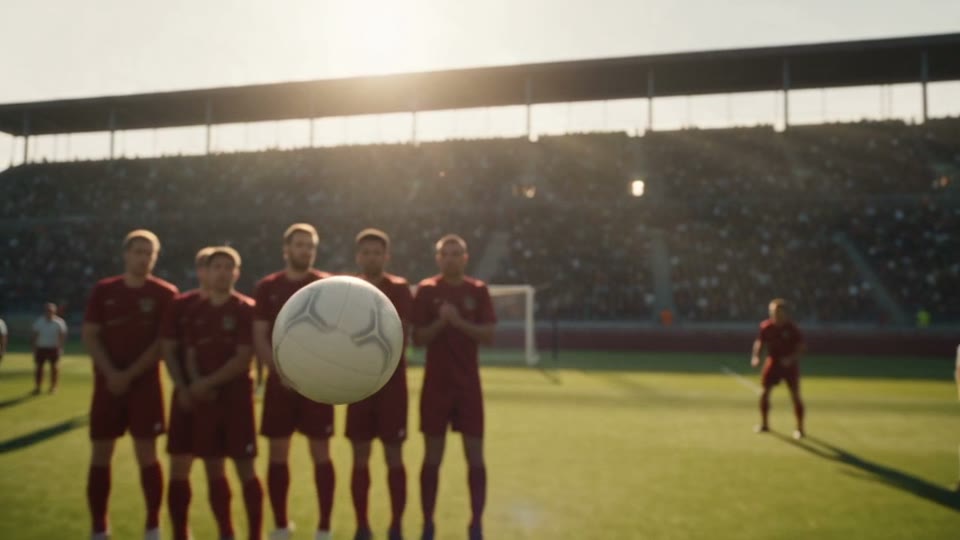
The free-kick reel's first and final takes. Top: a blockout with box people, and Seedance's take on it (the wall rendered as mannequins). Bottom: the same shot as colour blocks (yellow = the wall, blue = the ball) with a reference image per colour: real players. -
Animate it so it feels filmed
Subjects: give moving things a real path and steady starts and stops, and point vehicles along their line. People wait in place and step in, a beat apart, rather than gliding in together.
Camera: one continuous move with a reason for every change. Avoid dead stops (they read as keyframes) and sudden starts; let it drift slowly through a quiet moment, turn the frame overhead, and ease into the big move. If something fast passes the lens, move with it instead of whipping round. The skill's kit smooths the path and prints the peak speed, acceleration and pan rate so you can see a jolt before you render.
 Blockout
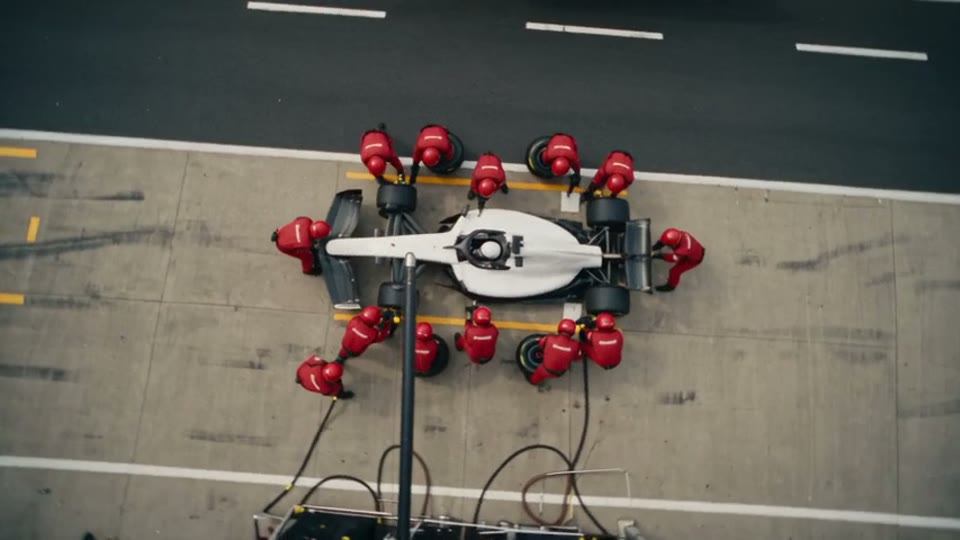 Seedance
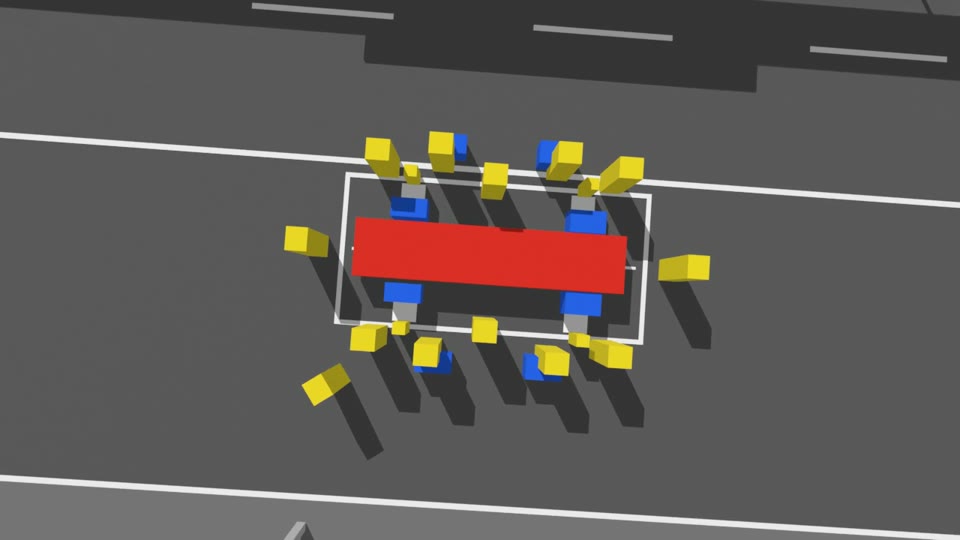
The pit-stop reel mid-stop: the camera turns slowly overhead while the crew (yellow) change the wheels (blue) on the car (red). The move took four rounds of fixes: wheels that rode alongside the car, a jittery entry, a camera that overshot and a crew that glided in. -
Render the blockout
Render 10 seconds at 1280x720, 24 fps, with simple flat lighting (one sun, a grey sky). EEVEE takes about a minute on a laptop. Check a few stills first: no recognisable shapes on subjects, every colour distinct, the camera never inside a wall.
Keep the blockout: it makes a great second panel next to the final shot, which is exactly how the reels show it.
-
Make the reference pack (and check it before any video)
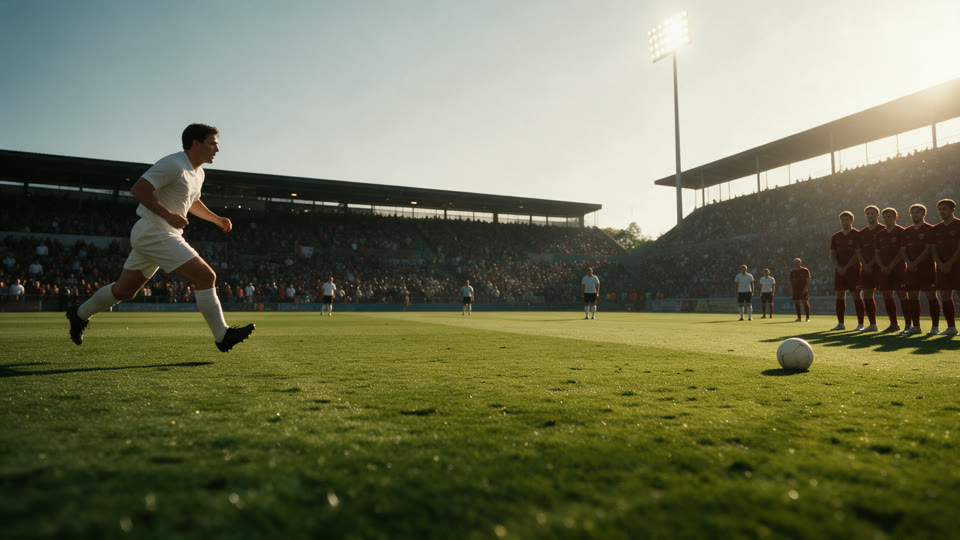
Look anchor: the opening moment as a real film still. Attach a blockout frame to an image model that takes a reference (Seedream 5.0, Nano Banana, GPT Image) and describe what each block really is, ending with film-look words: "Shot on ARRI Alexa Mini LF with Cooke S7 prime lenses, Kodak Vision3 500T film emulation, fine film grain, gentle halation". This image sets the grade for the whole shot.
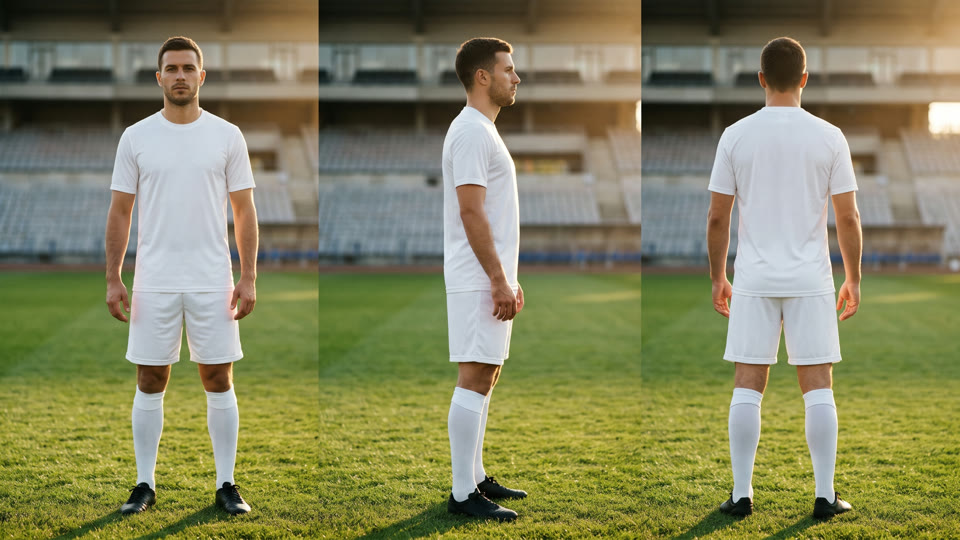
Then the location, empty, and one image per colour: a front, side and back character sheet for a person, a group shot for a group, a precise still for a vehicle or prop. Be exact: "a current-generation Formula 1 car", not "a race car" (the first pit-stop pack came back looking like a junior-series car). Look at the whole pack before you spend anything on video.
 1 · Look anchor
 2 · Location
 3 · Red
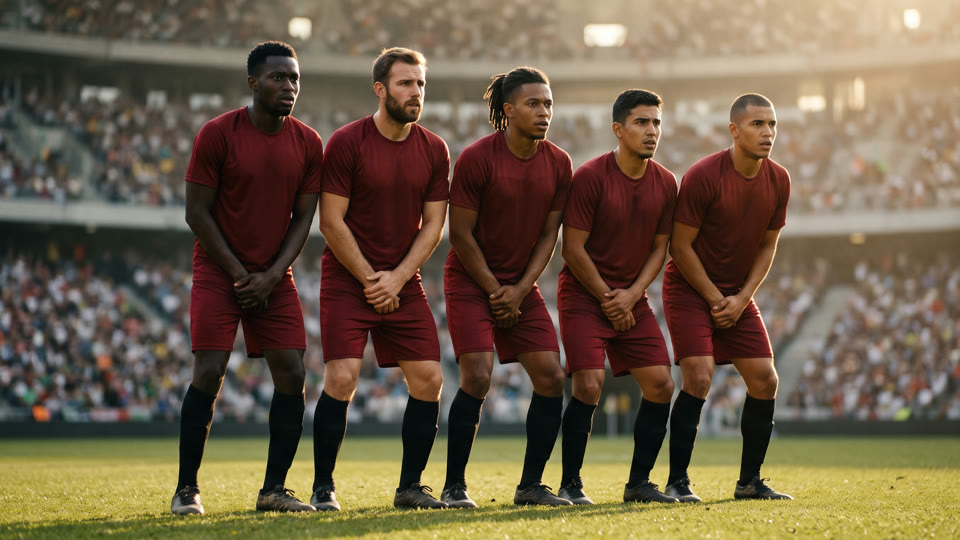 4 · Yellow
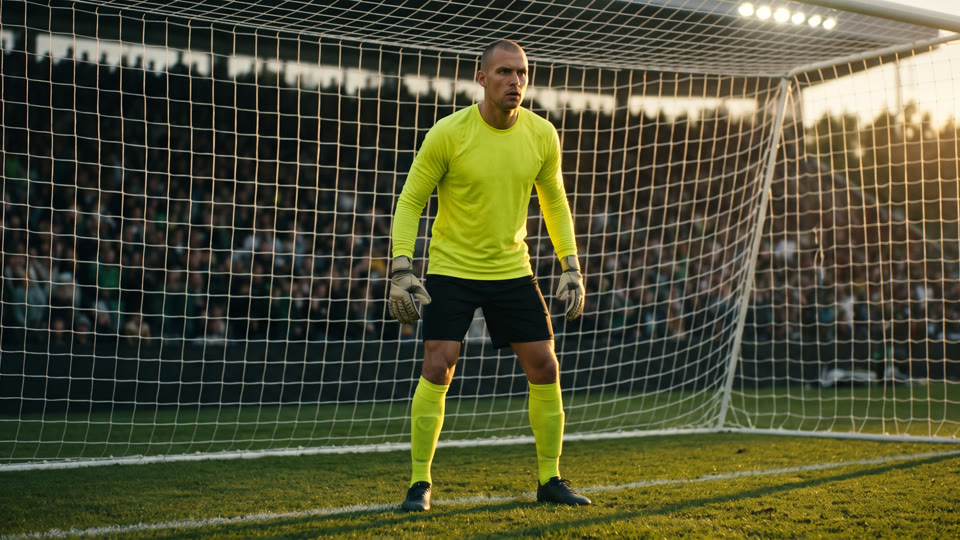 5 · Green
 6 · Blue
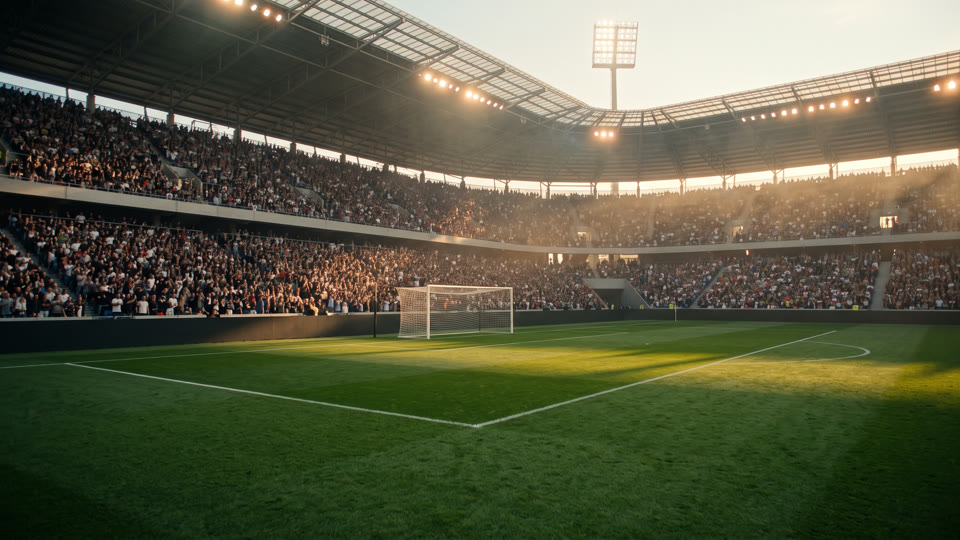
The free kick's reference pack, in the order the prompt numbers it: the look anchor (Seedream 5.0, restyled from the blockout's first frame), the stadium, then one image per colour (Nano Banana 2.1). 12.5 Higgsfield credits for the six. -
Write the Seedance prompt
Call the video a colour-coded blockout used only as a rough guide, and map every colour: "The red block corresponds to the striker in @Image 3. The five yellow blocks correspond to the wall in @Image 4." Give @Image 1 the look-anchor job (the grade, light and texture are read from it, not its composition) and @Image 2 the location.
Ask for natural, realistic movement and real physics, with the blockout's motion as a loose guideline, and say no coloured blocks or flat colours appear in the result. Describe the shot in 2 or 3 stages, add a line about the sound, and end with "No text, no captions, no logos. No music."
-
Render it in Seedance 2.5 and fix the cause
On Higgsfield, choose Seedance 2.5 in Omni reference mode, attach the blockout video and the images in the order your prompt numbers them, 10 seconds, 16:9, 480p for the first take, audio on. It takes about 5 to 8 minutes. Move up to 720p or 1080p for the take you keep.
Watch it for coloured blocks or boxes showing through, the wrong kind of object, logos or lettering in the background, and sections too dark to read. Fix the cause rather than rerolling: simplify the blockout, remake one reference image or tighten one prompt line. Keep earlier takes; sometimes the previous one is the keeper.
How the reel was made
The nine Blender reels were built as Python scene files run in Blender 5.2 without opening it (EEVEE, 1280x720, 24 fps, 10 seconds), then stacked in Remotion with the Seedance take on top and the blockout below.
The first round used detailed box people and box cars and a text-only prompt: Seedance rendered mannequins and toy cars. Adding reference images fixed the people but not the props. The final round used colour blocks plus a reference pack per scene (a Seedream 5.0 look anchor and Nano Banana 2.1 images) and Seedance 2.5 at 480p with audio on, 30 Higgsfield credits per scene in November 2026.
Where a take wasn't better, the reel kept the earlier one: the vault heist uses its first take over the new blockout.
The prompts behind the reel
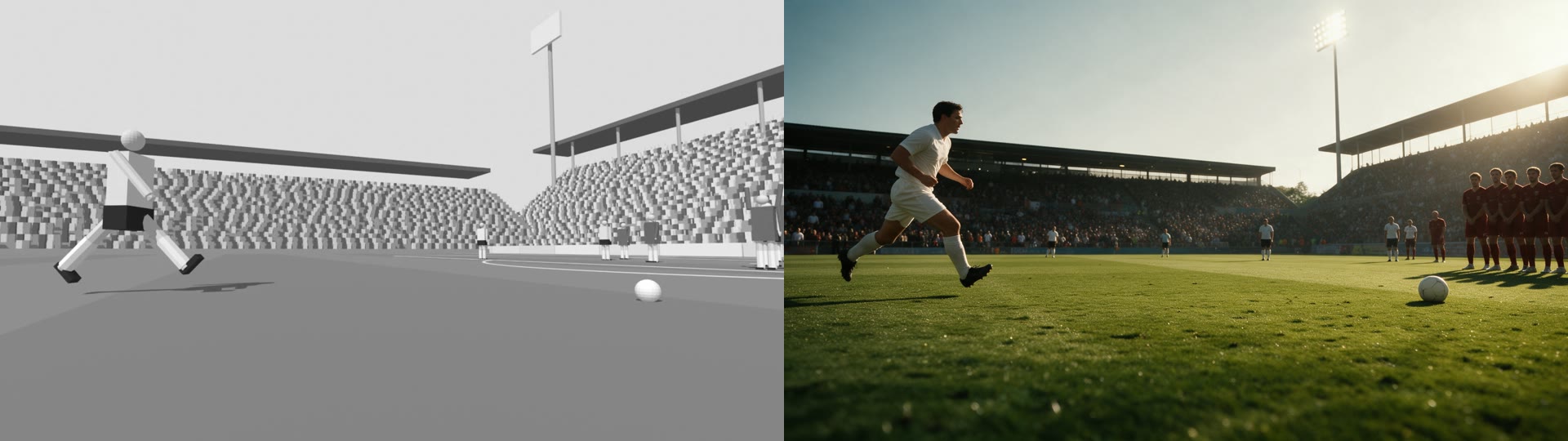
Re-imagine this grey 3D blockout as a photorealistic cinematic film still, keeping the exact same camera position, lens height, framing and the position of every element. The grey striding figure at left becomes a real professional footballer in a plain white kit, white socks and black boots, mid-stride in his run-up toward the ball. The small sphere becomes a white match ball resting on the grass. The distant row of figures becomes a defensive wall of five real players in plain dark red kits. The block stands become a packed football stadium full of real fans. Golden-hour summer evening, low warm sun raking from the right, long shadows across the turf, floodlights just switched on, slight haze. Shot on ARRI Alexa Mini LF with Cooke S7 prime lenses, Kodak Vision3 500T film emulation, fine film grain, gentle halation, shallow depth of field, cinematic color grade with warm golden highlights and deep green shadows. No logos, numbers, lettering or ad text anywhere.
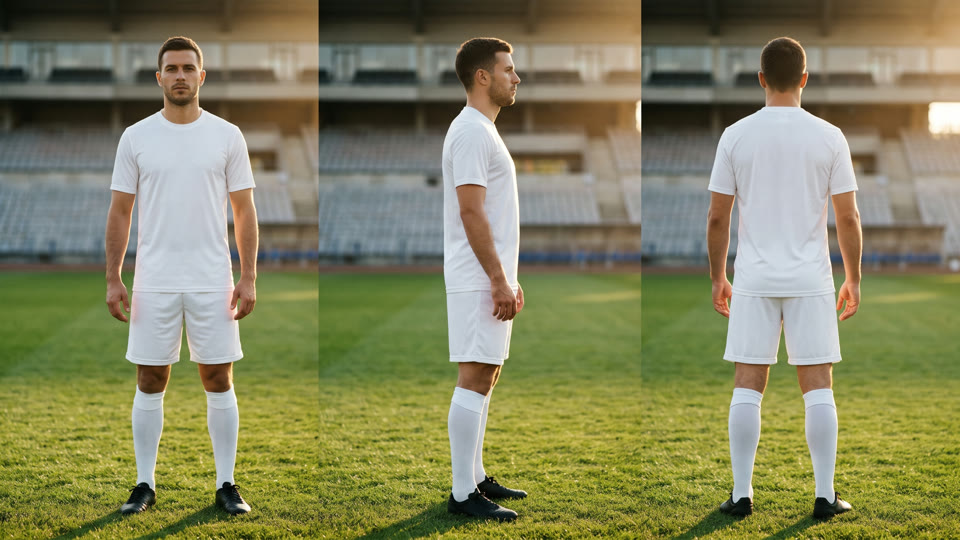
Cinematic character reference sheet of one professional footballer, the free-kick taker, shown three times side by side on the same stadium pitch: full body front view, full body side view, full body back view, identical person and kit in all three. Athletic man in his late twenties, short dark hair, light stubble, focused expression, plain white short-sleeve football kit, white shorts, white socks, black boots. Golden-hour light from the right, warm rim light, soft out-of-focus stadium behind. Shot on ARRI Alexa Mini LF with Cooke S7 prime lenses, Kodak Vision3 500T film emulation, fine film grain, cinematic color grade. No logos, numbers, lettering or text anywhere.
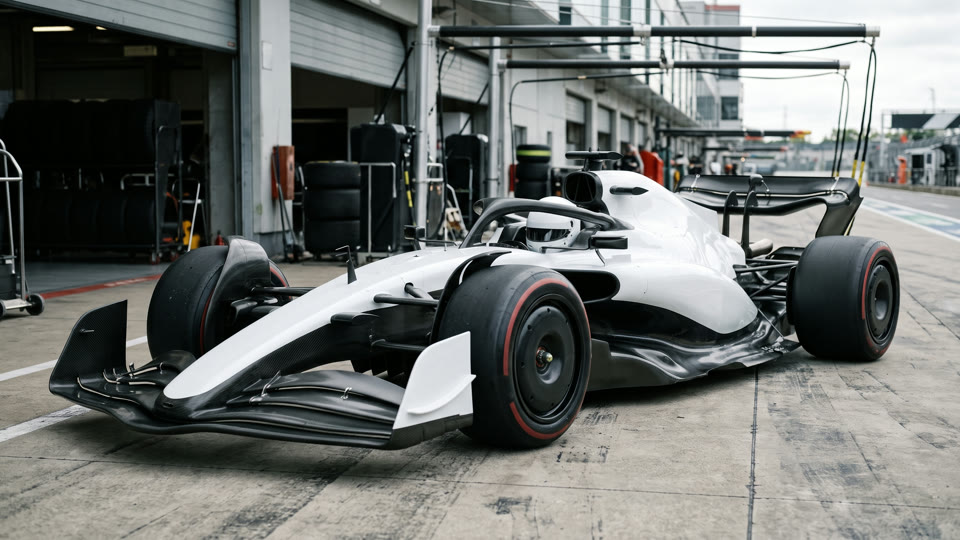
Cinematic three-quarter front still of one current-generation Formula 1 car standing in a pit lane, true to the latest F1 technical regulations: long wheelbase and very low stance, ground-effect floor with sculpted edges, deep sidepods with a strong undercut, a wide multi-element front wing, a high rear wing with a beam wing below, the halo over the cockpit and a driver in a plain white helmet, 18-inch wheels with flat aerodynamic wheel covers and wide low-profile slick tyres with a thin coloured compound band. Livery in plain gloss white and graphite carbon, no sponsor logos, numbers or lettering. Soft overcast skylight. Shot on ARRI Alexa Mini LF with Cooke S7 prime lenses, Kodak Vision3 500T film emulation, fine film grain, cinematic color grade in clean neutrals. No logos, brand marks, numbers, lettering or text anywhere.
[Reference Material Roles]
@Video 1 is a colour-coded blockout used only as a rough guide. Each solid coloured block stands in for one subject and shows only roughly where it is and which way it travels; the blocks have no shape of their own, so give every subject its full real form from its reference image. The grey shapes are the pitch, the goal frame, the stands and the roof. Follow its camera path and timing loosely, and generate your own natural, realistic human movement and real ball physics; the blockout's motion is a loose guideline, not something to copy.
The red block corresponds to the striker in @Image 3.
The five yellow blocks correspond to the five players of the defensive wall in @Image 4.
The green block corresponds to the goalkeeper in @Image 5.
The small blue block corresponds to the match ball in @Image 6.
The orange blocks correspond to the other players on the pitch, plus one referee in black.
The purple mass corresponds to the packed crowd in the stands from @Image 2.
@Image 1 is the look anchor: the grade, palette, golden-hour light, lens character and film texture are read from it. Do not copy its composition.
@Image 2 defines the stadium: the pitch, stands, crowd, roof, floodlights and the goal with its white net.
No coloured blocks, flat colours or grey placeholder surfaces appear in the final video.

[Coverage]
Stage 1 — 24mm, camera low behind the ball. The striker runs in past the lens, plants his standing foot and whips his instep through the ball.
Stage 2 — a gentle slow motion riding behind the spinning ball as it curls over the wall; the five defenders leap with natural, slightly staggered timing.
Stage 3 — the camera eases to a stop short of the goal line as the keeper dives full stretch and the ball dips into the top corner; the net billows.

One ball-cam free kick over the wall into the top corner. (Warm golden highlights, deep green shadows, fine film grain.) No text, no captions, no logos. No music.
Tips
- Less geometry is better: if a block looks like a person, a car or a prop, Seedance copies the block.
- Never give two different subjects the same colour; a group that looks alike can share one.
- Turn audio on: Seedance makes matching sound for free, and it beats foley you add afterwards.
- Do your first take at 480p, then render the keeper at a higher resolution.
- Ask for plain boards and no lettering in the location image too, or the video invents fake logos.
- If a take has the wrong kind of object, fix its reference image, not the prompt.
Going deeper
OptionalFor people running Seedance from code, or tuning a camera move by the numbers.
The API route
Higgsfield's API model bytedance/seedance-2.5/reference-to-video takes video_urls (your blockout), image_urls (in @Image order), prompt, duration (4 to 30 s), resolution (480p, 720p, 1080p), aspect_ratio and generate_audio (on by default). Files must be public URLs, so upload them to Higgsfield storage first.
Billing counts the reference video's seconds as well as the generated ones, at 0.6 times the normal token rate; images are free. A 10-second 480p render from a 10-second blockout was about $2.47 in November 2026. The free estimate endpoint prices any request before you run it, and the skill's seedance.py does all of this.
Why the camera felt keyframed, and the fix
Camera keys joined by a smooth spline overshoot when the camera has to stop, so it drifts back and wobbles; a key that brings it to rest reads as a stop-start. The fix was one continuous move with slow drifts instead of holds, longer eases into big moves, tracking with fast subjects, and a light gaussian smoothing pass over the baked path.
Numbers worth checking on any blockout: no full stops, a peak pan under about 100 degrees a second, and a peak acceleration under about 30 m/s². The skill's kit prints all three after every build.
Claude skill
Do it in one go with the blender-blockout-to-seedance skill
Describe a shot and Claude plans the beats and the colour legend, writes the Blender scene file with a bundled kit (coloured blocks, a smoothed camera, one-command render), writes the reference-pack prompts and the Seedance 2.5 prompt that maps every colour. In Claude Code with Blender it builds and renders the blockout itself, and with your Higgsfield key it can price and run the Seedance render.
Download blender-blockout-to-seedance.zipIn Claude (web or desktop app)
- Open Settings → Capabilities and make sure code execution is on.
- Under Skills, choose Upload skill and pick the zip.
- Start a chat and describe the shot you want. On the web Claude writes the scene file and prompts for you to run; Claude Code (with Blender installed) builds and renders the blockout itself.
In Claude Code
- Unzip it into
~/.claude/skills/(or.claude/skills/in a project). - Restart Claude Code and ask for the result. The skill loads when it fits.